Beyond Autonomous: Why I’m Building an Amphibious Agent2026-04-19
I’m very excited to launch a brand-new open-source repository—AmphiLoop. But this is more than just a code repository; it’s a brand-new methodology, tech stack, and toolchain for building automation systems & AI agents. It allows us to describe and orchestrate tasks using natural language, while also having the ability to automatically switch between workflow mode and agent mode at runtime.
This is precisely where the name “AmphiLoop” comes from—Amphibious Loop! Next I’ll go into detail about the whole system and the principles behind it. The article is long, and was entirely written by my own hand (with no AI assistance). I recommend bookmarking it first and reading it slowly later.
Click here to download the source code ➜ https://github.com/bitsky-tech/AmphiLoop/
The Rise of OpenClaw and the Challenges of Enterprise Adoption
OpenClaw is gaining a lot of traction.
Its explosive popularity makes sense: in daily work there are indeed a large number of tedious operations—organizing documents, searching for information, shuttling forms across systems—these operations aren’t hard yet they drain human energy. With agents like OpenClaw, Hermes Agent, and CoWork, ordinary people for the first time have a tool that can quickly turn language into action. Humans can be liberated from step-by-step manual operations, shifting their role from routine executors to reviewers. This experience is truly full of delight.
Enterprises are eager to bring the “OpenClaw” capability into their core business, as intuitively, driving business process automation with natural language promises a significant boost in productivity. However, the inherent unpredictability of AI becomes particularly evident in the OpenClaw paradigm:
- Is it safe? Without permissions it can’t really do work; but if you give it permissions, what if it goes rogue?
- Is it stable? Running on a personal desktop, occasional misbehavior is fine; but in serious scenarios, can you guarantee 100% operational stability?
- Is it expensive? Everyone knows the OpenClaw is a token guzzler, and usage varies greatly. For an individual user, if the monthly token bill blows up, you might spend a few hundred extra bucks that month—no big deal. But for an enterprise user, a blown-up bill is no joke.
Looking at task scale, enterprise tasks also differ from personal tasks. Personal tasks are usually small desktop tasks: organizing emails, organizing drafts, retrieving information, etc. These tasks are usually tiny in scale, and of course, the joy brought by automation is just momentary. But the cooler thing is actually using AI to build entire automated systems.
In fact, the efficiency gains from AI coding have dramatically accelerated software iteration. The issue this raises is that from the software engineering lifecycle perspective, if coding efficiency has gone up, the efficiency of other phases also needs to keep up. Testing, deployment, operations, and even the generation and management of requirements need to keep up with the pace of software iteration in the new era. This requires building an entire AI automation system.
Acceleration means frequent change. Take automated testing: if the product UI iterates every day, even several times a day, how can automated testing keep up? Conventional wisdom says, for products that change frequently, skip the test scripts and just do manual testing—but this burns huge amounts of labor. Conversely, if you maintain a suite of automated test scripts, as the product iterates quickly, the test scripts also need frequent modification, bringing additional maintenance costs. Another approach is the so-called “OpenClawized” model: imagine an enterprise-scale OpenClaw system. Whenever product requirements change, you simply feed them into the system, which then automatically runs testing and validation. This idea has some merit—after all, automated testing is itself invoking various tools, and the most efficient way to invoke tools right now is through AI (using magic to fight magic). But this brings us back to the issues discussed earlier: Is its execution controllable (the stability problem)? Does it burn a lot of tokens (the cost problem)?
The reason this is so vexing is that our requirements themselves often appear contradictory — or, more bluntly, a classic “have your cake and eat it too” situation. We want the efficiency of rapidly turning language into action (to adapt to a changing environment), but also expect reliability, safety, and low cost.
All of this has held back AI technology from being adopted in broader and deeper scenarios.
Some people used to say this is mainly an accuracy problem. As model capability improves, accuracy goes up, and then it’s stable and controllable, so you can use AI in more scenarios. Honestly, that conclusion is very one-sided. Looking at past industrial revolutions, AI as a tool is unlike the steam engine, the internal combustion engine, electricity, or most information technology tools—AI is fundamentally probabilistic and full of uncertainty. Today’s AI is a soft kind of power, and it solves fairly soft problems. Accuracy can improve but it can never reach 100% certainty; on the other hand, the cost of tokens is not to be dismissed.
So the main reason AI technology is hard to put into production is not that its accuracy is still not high enough, but rather that we are using this unique capability the wrong way. Technology only realizes its full power when used properly. Therefore, We need a fundamentally new way of wielding AI, underpinned by a new methodology and tech stack.
This is also the underlying rationale for why we developed AmphiLoop (and the Bridgic framework it depends on).
Analyzing the Essence of the Problem
As mentioned, AI is a unique tool; it is inherently incapable of reaching 100% accuracy. In my article from late last year, 2026 Could Mark a “Reset to Zero” for the AI Agent Era, we also discussed a concept called error accumulation. For example: suppose executing a task takes 5 steps, and each step succeeds with a 90% probability; then the overall success probability is only 59%.
This means that as the number of steps in a task grows, the probability that the AI-driven task will fail grows as well. Note that the error accumulation effect is rooted in probability theory—it cannot be changed. So does that mean that using AI to complete automated tasks is fundamentally hopeless? If so, has the current OpenClaw product form reached its ceiling at this stage? Is it doomed to be merely an AI toy that can never be used in genuinely serious, high-value scenarios?
Of course, the statement of the problem itself is too coarse. We need to break it down and analyze it.
First, different tasks have different natures. Using the dimension “whether the task’s goal and path are clear,” let’s try to roughly classify tasks:
- (1) Deterministic tasks. The task’s goal and path are both very clear. For example, go to the order list page, select the “Pending” status from the dropdown menu, then click the “Search” button to retrieve the filtered order list. Such tasks exist in large numbers, and traditional programming techniques can automate them. Their main issue is implementation cost.
- (2) Tasks whose goal is very clear but path is unclear. For example, chess play, or versus-type games. The goal—winning the game, beating the opponent—is very clear, but exactly how to win is not known.
- (3) Tasks whose goal is roughly clear. Such tasks are also abundant, but only became relatively tractable in the era of large language models; earlier traditional programming techniques did very poorly on them. Since such problems are important, let me give a few more examples.
- First example: suppose under a specified directory there are many collected materials and work files; please help me organize these materials and then write a report on topic XXX. The task’s goal is relatively clear—produce a report—but what the report should look like and how good it should be are not clear. So we say “roughly clear goal.” As for the specific implementation path, exactly how to produce this report, and which material to look up first and which next while writing, and how text from references is cited and assembled in the report, I have not specified and do not want to care about. So the task’s path is unclear.
- Second example: search the entire web for Andrej Karpathy’s latest activity, and summarize what he is focusing on recently and what his new research directions are. The goal is relatively clear, but where to search and how to search—the path is unclear.
- Third example: generate a video for me based on a reference image and a script. The goal of video generation is clear, but it’s unclear what the final video should look like to meet my expectations. Likewise, how the generation is completed is also unclear, and I don’t care.
- Fourth example: help me tidy up my desktop; help me reply to emails in batch, etc.
- (4) Hybrid tasks. Usually a combination of categories (1) and (3) above. For example, go to GitHub to view a repository’s releases page, and go through the pages to view the release records for the past 7 days, then write a summary telling me what the main iteration directions have been recently. The first half of this task is a deterministic task (goal and path both clear); the latter half falls into category (3).
Second, let’s look at the other side of the matter: what approaches are available for automating these different types of tasks? Before LLMs, we needed to build software programs—that is, deterministic code (with branches and loops)—to execute a task. After LLMs appeared, we gained another option: the agentic loop (similar to the on-the-fly planning and execution capability OpenClaw provides). As I discussed in my earlier article Software Development Paradigms in the AI Agent Era, the autonomy of planning introduced by LLMs is the “new” characteristic of software development in the AI agent era. So now we have two fundamentally distinct execution modes: workflow mode and agent mode. The former uses deterministic code (model-independent); the latter uses an agentic loop like OpenClaw’s (model-dependent).
OK, the correspondence between the task categories above and the two execution modes here can be summarized as follows:
- Category (1) deterministic tasks can be driven by either workflow mode or agent mode.
- Category (2) and (3) tasks, which contain more “uncertainty,” can only be driven by agent mode.
It looks like agent mode is “universal”—as if it can do anything. But this is exactly where expectations and actual usage diverge with AI! When the category (1) deterministic task is driven by agent mode, there are many problems:
- When the task is complex (long-range), it becomes unstable. The same task may yield different results on repeated runs. This is determined by AI’s probabilistic nature mentioned earlier; the effect of error accumulation is evident here.
- Token consumption is extremely high. Agent mode’s energy cost is far higher than workflow mode’s.
- Instability also causes many security issues. For instance, execution error may lead to privilege escalation or unsafe operations, whereas prompt injection can result in unauthorized control.
This is a major misuse of AI today: applying the wrong approach to what is fundamentally a deterministic problem!. It is also a mistake many people make when using OpenClaw, indiscriminately handing every task to AI.
So, for ad-hoc (possibly one-off) tasks with unclear paths (and possibly unclear goals), agent mode is the most appropriate (sometimes the only) way; for deterministic, long-range, routine tasks, workflow mode is the most appropriate.
Of course, workflow mode has its weaknesses: it’s not flexible enough to change, and it cannot adapt to environmental changes. Therefore, to combine the strengths of the various technologies, we can understand some key design decisions of AmphiLoop:
- Use natural language to describe tasks. Enjoy the efficiency of quickly turning language into action, enabling flexible requirement changes.
- A methodology and toolchain where the code construction process is guided by an “explore - code - verify” loop. AmphiLoop does not directly use agent mode to execute natural-language-described tasks; rather, it transforms natural language into code at the lowest possible cost. The “explore - code - verify” methodology is used to lower the barrier to this transformation.
- The generated code contains both workflow mode and agent mode. The two modes can be combined and even auto-switched. This is why it is called “amphibious”.
Regarding the combination of workflow mode and agent mode, as well as their automatic switching, further clarification is needed. After breaking down the task taxonomy, we find that the real world is already quite complex. But that is not all—real-world tasks exhibit significant variability.
The first observation is that task uncertainty is strongly dependent on how the task is described. What does that mean? For example, in the category (3) tasks above, the “search Andrej Karpathy’s latest activity” example, we did not specify exactly where to search or how to search. At that point the path is quite unclear, which may affect the quality of task execution. Let’s try to write more personal experience about Andrej Karpathy into this task. Suppose we first did some investigation and found that Andrej Karpathy has a personal website, 3 blog addresses, and a YouTube channel, but these haven’t been updated for at least half a year. The places where Karpathy remains frequently active are mainly two: Twitter (x.com) and GitHub. Then at this point my search strategy becomes clear and targeted. If we incorporate these specific search strategies into the task description, then this task contains more “deterministic” components.
This shows that the level of detail and specificity in requirement descriptions can cause what was previously uncertain to become certain, or conversely make what was previously certain become uncertain. This requires our solution to generate code appropriately based on semantics—ideally generating workflow code for the deterministic parts of the task, and generating agent code for the uncertain parts that require autonomy.
The second observation is that tasks may encounter environmental changes during execution. For example, when automating operations on a website page, a page redesign can break the automation if element positions or identifiers change. Or take the automated testing scenario we mentioned before: the product page under test may undergo layout changes as requirements evolve. Normally, workflow mode may be more appropriate (stable, token-saving), but once this environmental change occurs, workflow mode is not able to handle it. In that case, it would be best if the program could automatically switch to agent mode to continue the task execution.
Both dimensions of variability were taken into account in AmphiLoop’s architecture design. This shows that it no longer fits within existing industry-standard agent runtime modes. It is neither a pure workflow system nor a pure agent system, but a new runtime paradigm for agents—the amphibious mode!
Introducing AmphiLoop
What is AmphiLoop?
AmphiLoop, short for Amphibious Loop, is a new methodology, technology stack, and toolchain for building automation systems & AI agents. It enables tasks to be described and orchestrated using natural language, with an “Explore → Code → Verify” loop guiding code generation and build. The resulting artifacts are capable of automatically switching between workflow mode and agent mode at runtime.
Currently, AmphiLoop is implemented as a plugin comprising commands, skills, subagents, and hooks, intended for use with coding agents that support plugins, such as Claude Code.
AmphiLoop is backed by several Bridgic sub-frameworks:
bridgic-amphibious: provides the amphibious capability for the artifacts.bridgic-core: provides the underlying orchestration and conceptual abstractions, plus human-in-the-loop support.bridgic-browser: provides CLI and Python tools for browser automation.
What can AmphiLoop do?
In summary:
- Use
TASK.mdto describe and maintain long-horizon automation tasks in natural language. This serves as a prototype for a structured, evolving requirement specification. Unlike the throwaway approach, where task descriptions are discarded after a single use, this approach treats tasks as iterative, maintainable, and continuously evolvable units.. - Commands guide low-barrier generation of workflow code. Repeatedly executable, stable, zero tokens; high generation success rate, typically succeeds in one shot.
- Commands guide generation of unique amphiflow code. The code simultaneously has workflow mode and agent mode, and can auto-switch modes based on environmental changes.
- In theory supports any long-horizon automation task, but is optimized for browser automation, with a dedicated
bridgic-browsertool set.
How to Install AmphiLoop
To configure and use it with Claude Code, just run these two commands:
# Step 1: register the marketplace
claude plugin marketplace add bitsky-tech/AmphiLoop

# Step 2: install the plugin
claude plugin install AmphiLoop
You can also use the /plugin command inside Claude Code to manage it (install, update, uninstall, etc.).
AmphiLoop Usage Examples
Getting started with AmphiLoop is simple—just type /build-browser in Claude Code, and the system will prompt the complete command, as shown:

Then the system will guide you through the subsequent flow. The whole flow roughly consists of the following stages:
- Create
TASK.md. - Choose a few key configuration options.
- Environment initialization.
- Explore, producing an exploration report.
- Generate code.
- Verify.
- Further fix code (if needed).
Basically, you only need to focus on the first step: following the system prompts, create TASK.md and describe task requirements entirely in natural language.
When using AmphiLoop, it’s recommended to choose a model with strong coding capability, which can greatly improve the code generation success rate. AmphiLoop’s advantage is that once the program is generated successfully, subsequent runs greatly reduce token consumption (zero consumption for deterministic tasks).
【Create TASK.md】
After running /build-browser, if the task requirement hasn’t been created yet, the system will prompt as follows:
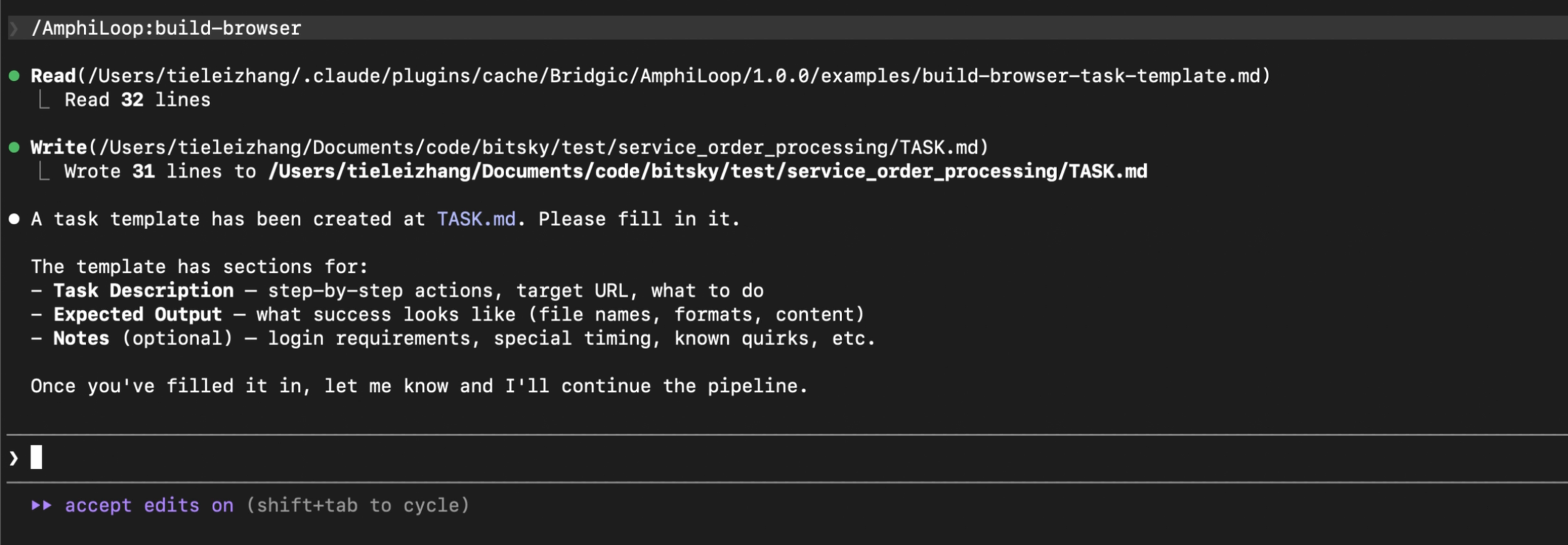
The system has prepared a TASK.md template for you. Next you need to modify this template and describe your own requirements. Throughout the entire process, this is the only thing you absolutely need to do. Here’s an example:
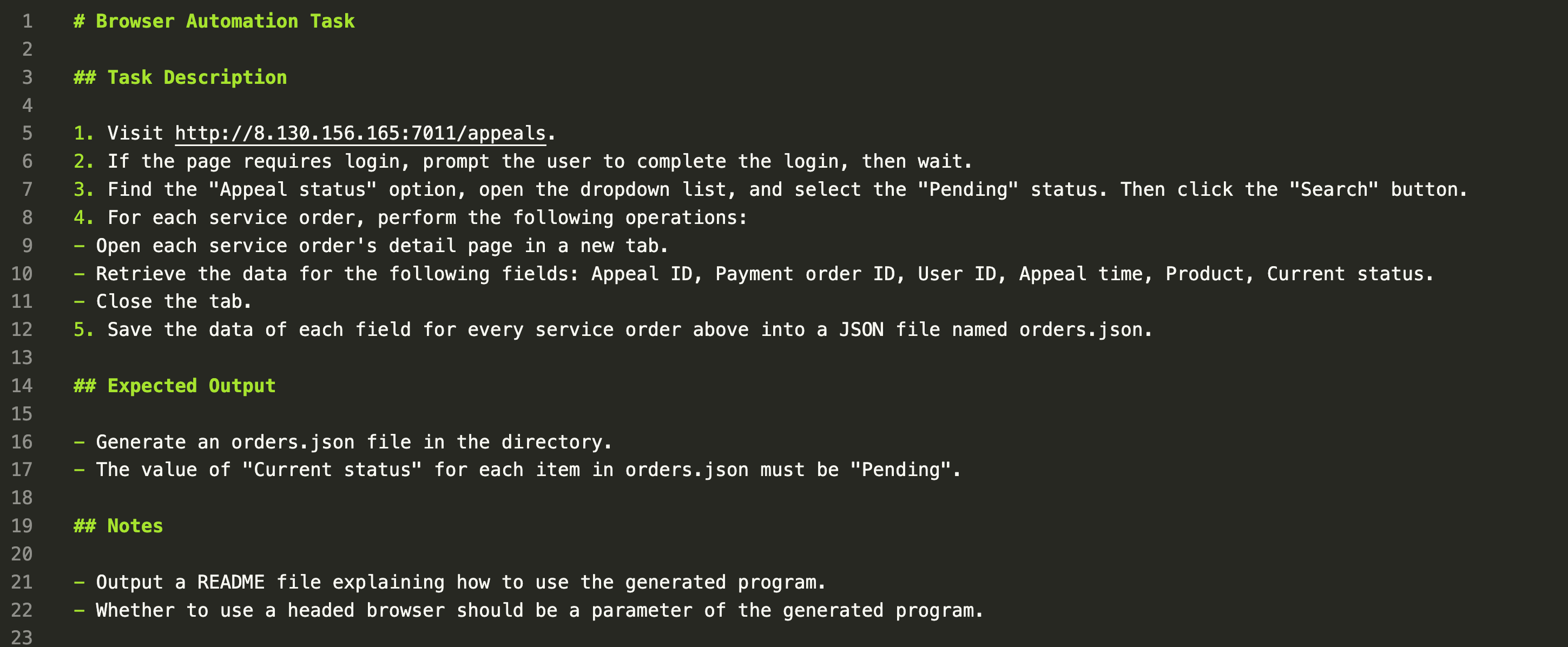
This file can just be written in natural language:
- In the Task Description section, try to describe as specifically as possible each step of the action to be executed.
- In the Expected Output section, describe the expected output of this task (meaning the final produced output when the generated program runs). Note: AmphiLoop will ultimately check the description in Expected Output and verify the execution result of the generated program against it. This is an extremely important part for improving the generation success rate and deserves serious attention. For example, in the screenshot above, the Expected Output section not only mentions that the program will output an
orders.jsonfile, but also mentions certain states in that file that can be used for validation. - In the Notes section, you can mention some personalized requirements—for example, what control parameters the generated program provides.
After writing TASK.md, tell Claude Code that you’re done:
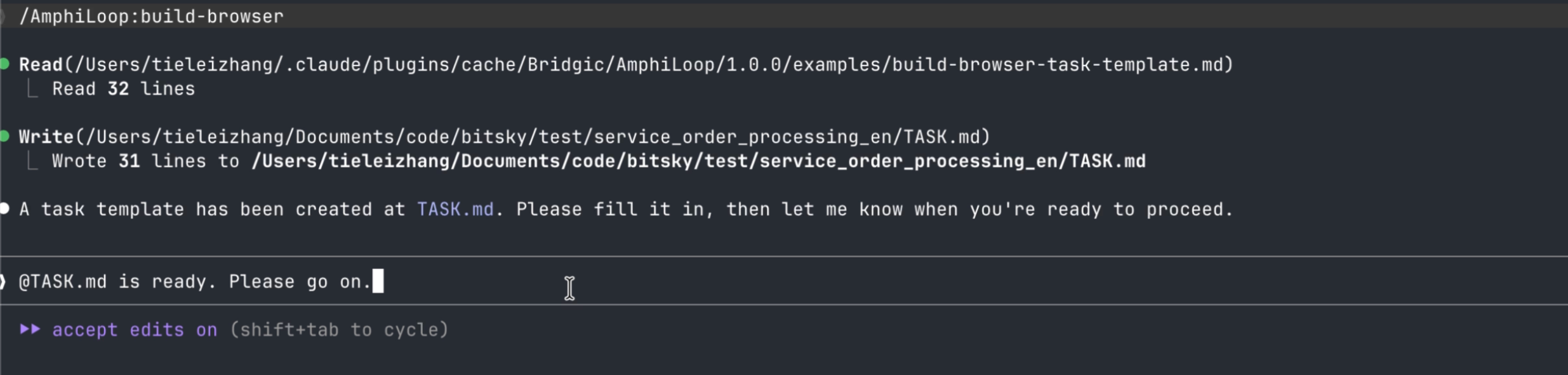
After completing this step, if the description in TASK.md is reasonably clear, the subsequent process is probably automatic. You just need to press 1 or 2 to approve Claude Code’s permission requests.
【Choose Configuration Options】
The current AmphiLoop plugin provides two configuration options you need to choose based on your requirements.
The first option is: “project mode”.
AmphiLoop provides two choices here:
- Workflow: the generated program mainly runs in workflow mode, suitable for stable, predictable tasks. This mode only calls the LLM when necessary. So if TASK.md describes a task without “uncertainty,” the generated program will consume zero tokens.
- Amphiflow: this is a unique program format introduced by AmphiLoop. The generated program supports both workflow mode and agent mode, and can automatically switch between them based on environmental changes. If you choose this project mode, the next step is to create a
.envfile to configure an LLM model (required for agent-mode runtime). This mode is suitable for tasks with frequently changing requirements or a dynamic runtime environment.
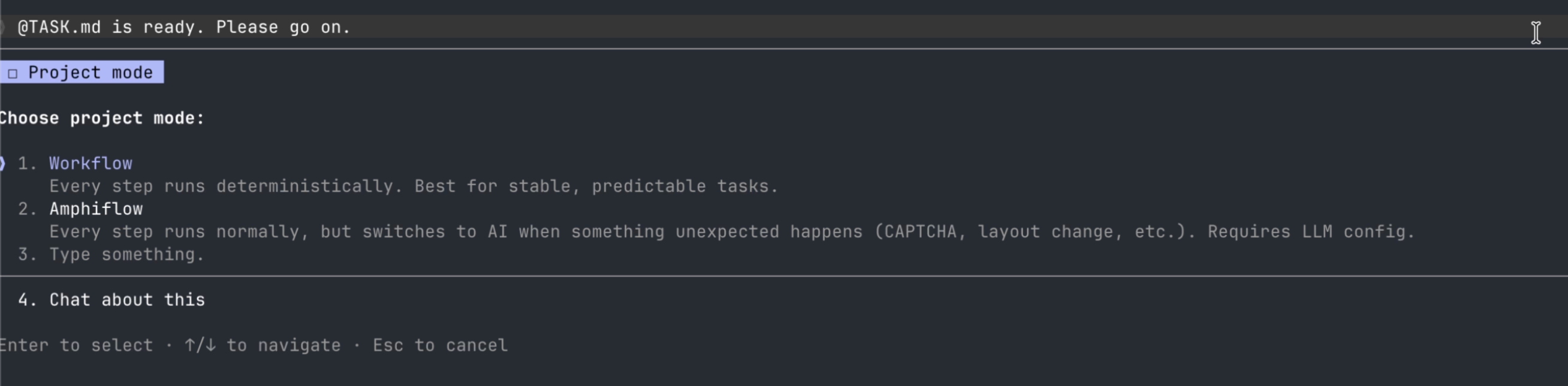
The second option is: “browser mode”.
When the task involves browser automation, this option appears. Two choices are provided:
- Default mode: different browser instances share user state. For example, once logged in, the next time you open the browser, the login state is generally kept.
- Isolated mode: different browser instances use isolated user state. That is, each time you open the browser, the user state is cleared. Useful for scenarios like automated testing.
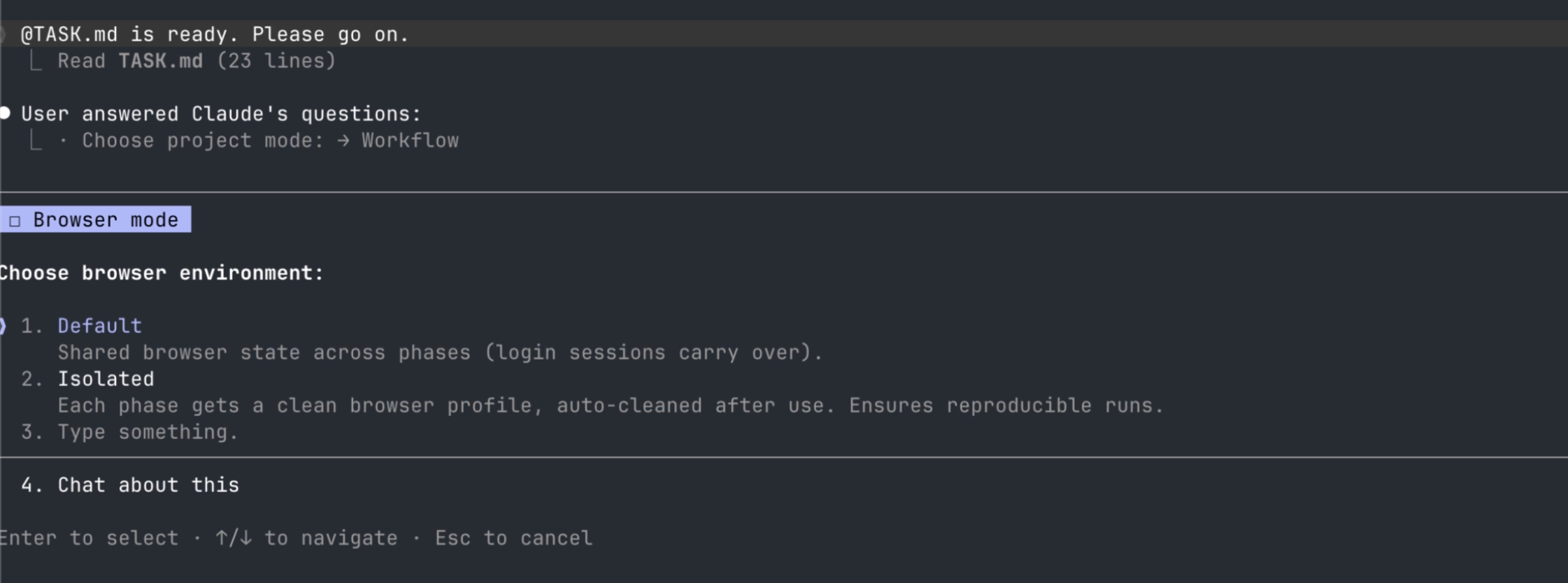
【Environment Initialization】
This step is fully automated. The AmphiLoop plugin currently uses uv to manage the build and runtime environment, so users don’t need to worry about how to install the underlying dependencies.
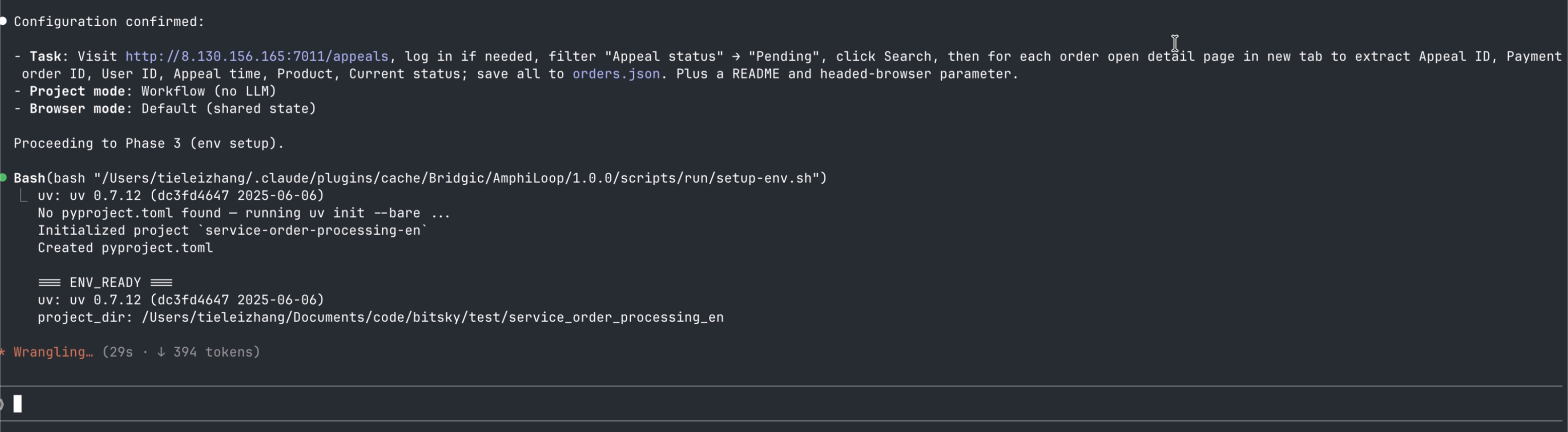
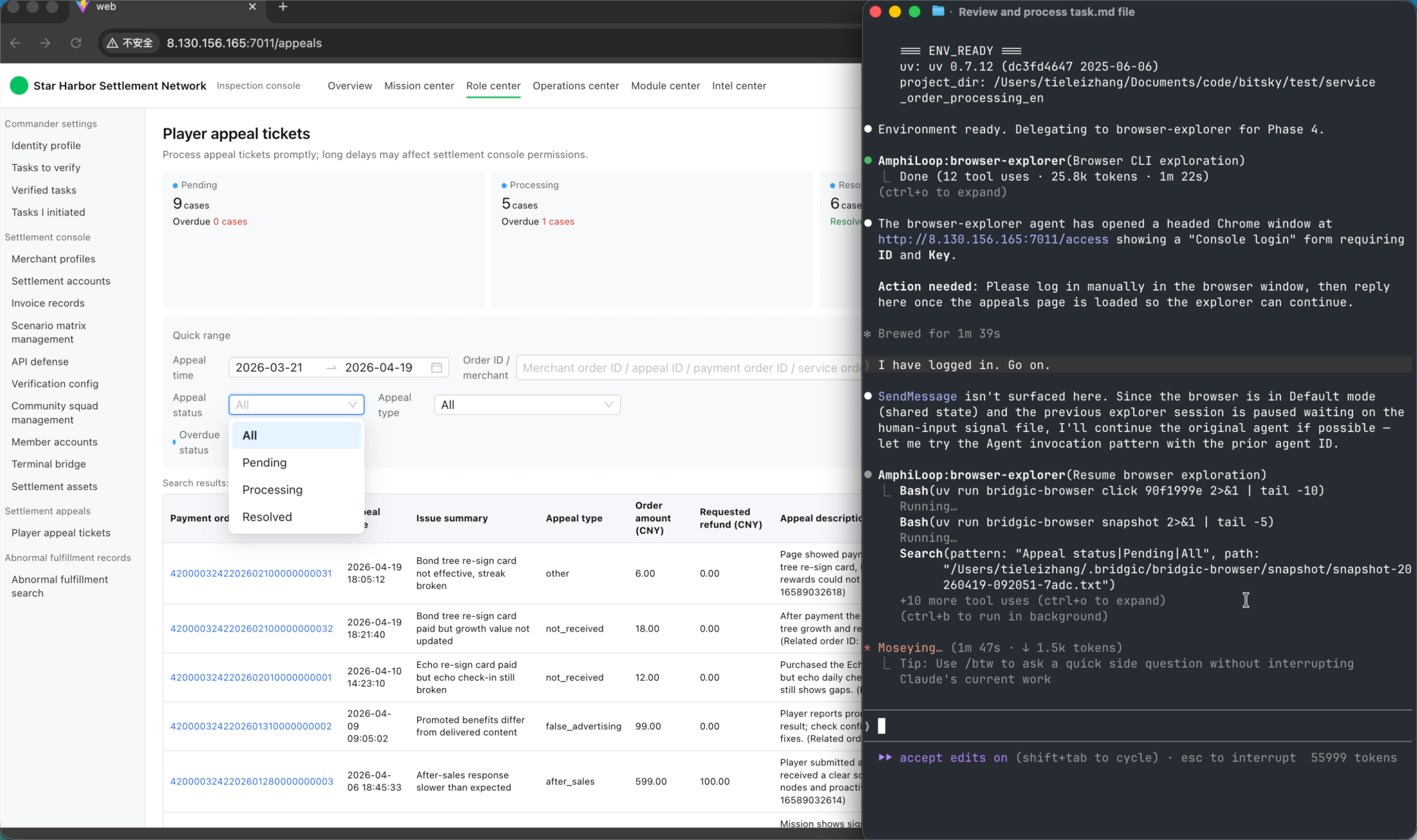
【Exploration】
Exploration refers to the system conducting preliminary exploration of the execution path based on the task description, in order to prepare for subsequent code generation. During exploration, the system calls CLI tools (including the bridgic-browser CLI tools) and obtains some dynamic, unknown information such as the invocation sequence of the CLI tools, their return values, and page structures.
After exploration, an exploration report exploration_report.md is produced. Here is an example:
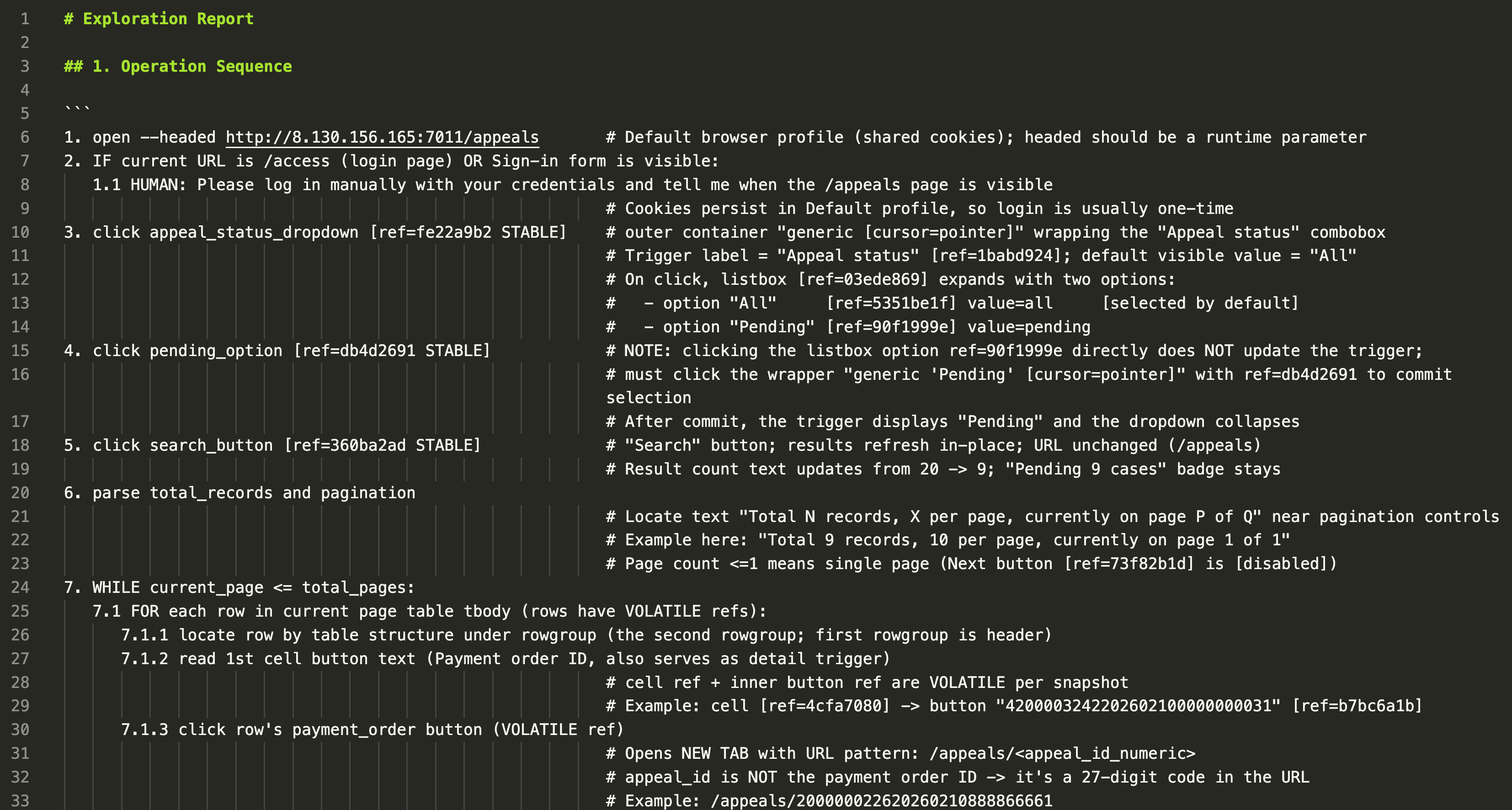
【Code Generate】
This step is fully automated. The system references the exploration report above to write code. Based on the previously selected “project mode” option, the system will generate either a Workflow program or an Amphiflow program accordingly.
【Verification and Bug-fix】
After code generation is done, AmphiLoop guides Claude Code to run verification tests on the generated program.
On one hand, AmphiLoop verifies whether the program runs normally; on the other hand, it also focuses on the Expected Output description in TASK.md and verifies the program’s execution result against it.
If it finds an error, it will automatically fix the code. During the code-fix process, AmphiLoop may guide the program to run and verify multiple times—this is expected behavior.
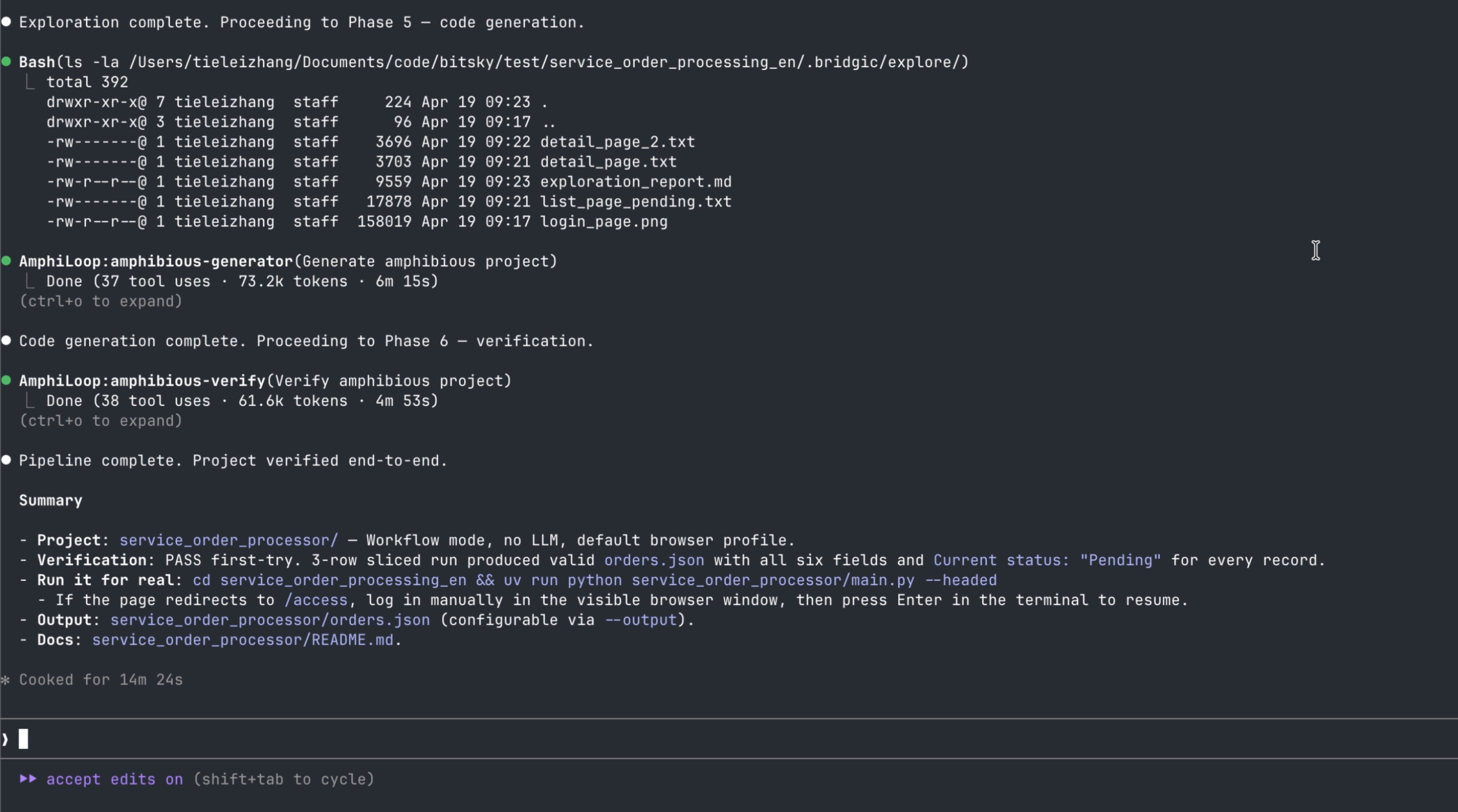
【Program Execution】
After verification is done, the program build phase is fully complete. The generated program can be invoked and run using uv run, and can be executed repeatedly and stably.
Each time the program finishes running, it prints the execution of each step as well as the total token consumption:
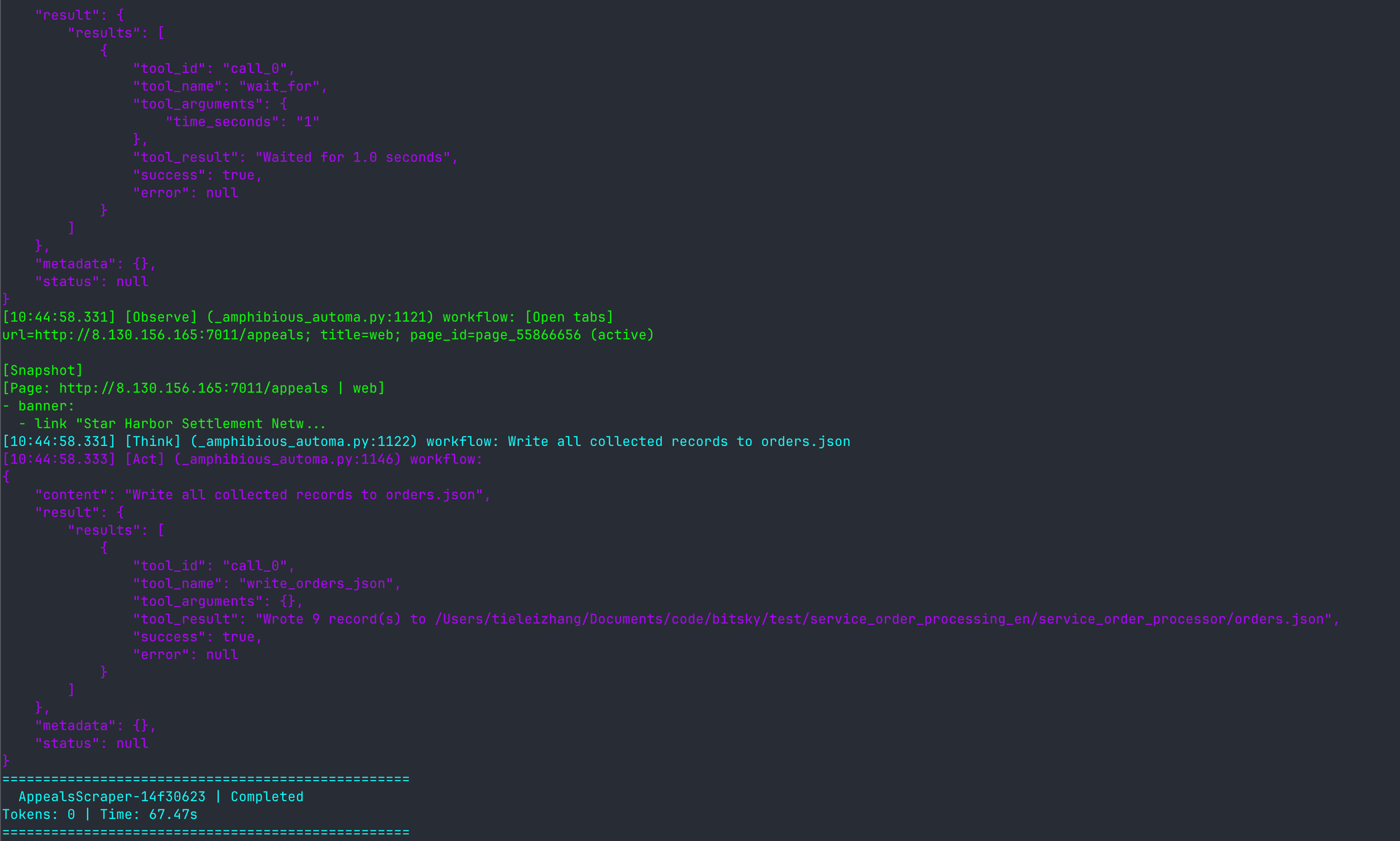
In the example above, the token consumption is zero! This is related to the nature of the task itself. Of course, given a task description, AmphiLoop’s approach reduces token consumption to the theoretical minimum. AmphiLoop is theoretically the most token-efficient AI solution.
Example of Amphiflow Mode Switching
This subsection demonstrates AmphiLoop’s amphibious switching capability.
The prerequisite for this capability is that you chose “Amphiflow” in the “project mode” option earlier. In that case, when the AmphiLoop build process is complete, the artifact is not an ordinary workflow program but a brand-new amphiflow program.
This amphiflow supports both workflow mode and agent mode. A typical execution flow looks like:
- When the amphiflow starts up, it first runs in workflow mode. At this point it executes deterministic logic.
- When an error occurs due to environmental change, the amphiflow automatically switches to agent mode, with the model taking over the execution logic and autonomously planning the execution path.
- When the amphiflow successfully solves or bypasses the error in agent mode, it switches back to workflow mode.
Suppose a browser automation program is visiting and operating some web page. Under normal circumstances, because the browser has kept the login state, everything operates normally. But once the login state expires, the program may encounter an unexpected error. At this point, an ordinary workflow program would error out and exit. But an amphiflow program would initiate a switch to agent mode—here is an actual example of a run:
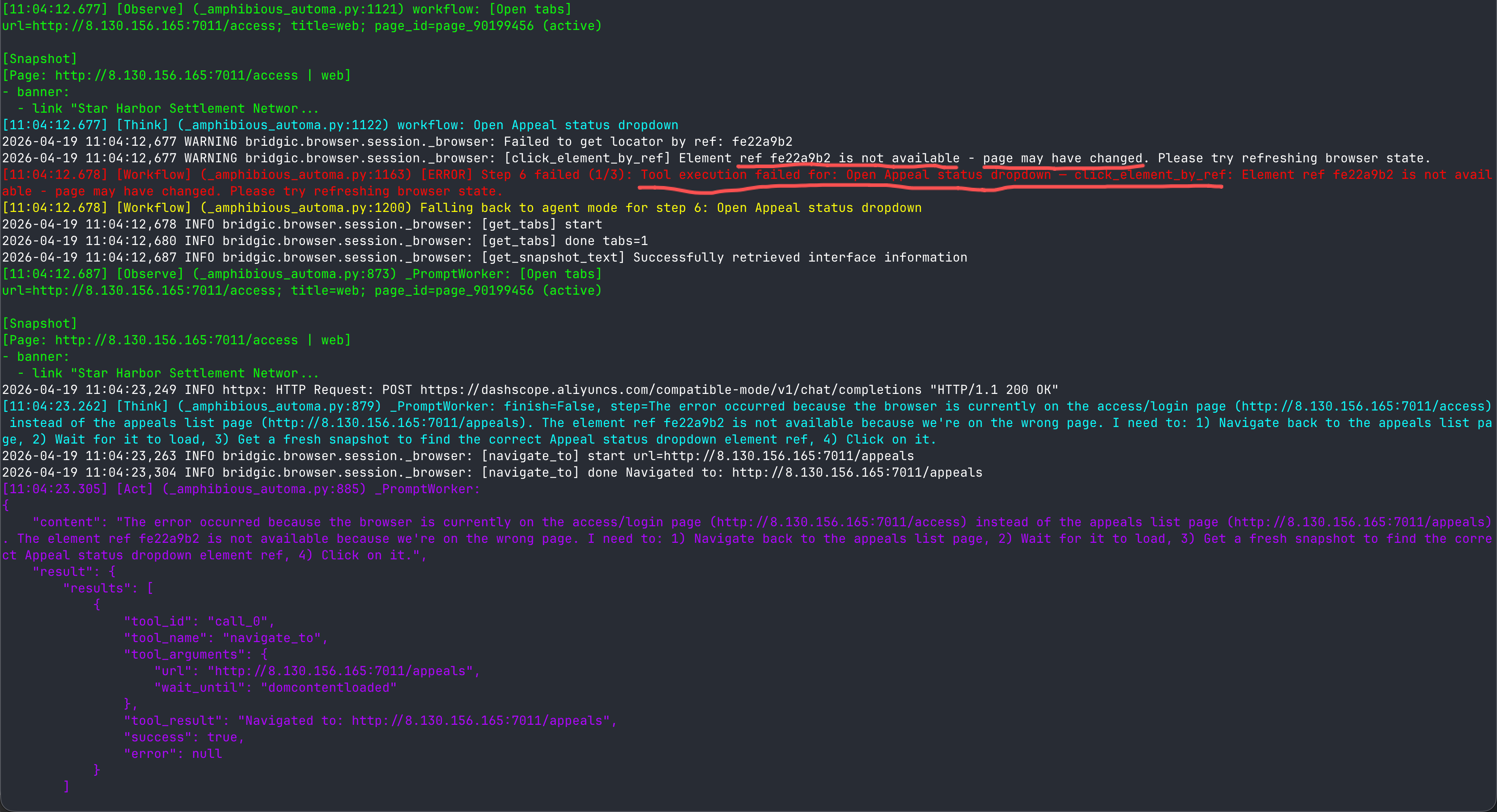
The amphiflow detected the error, then through further “observation” (in this example get_snapshot_text), inferred what actually happened. Then it found that it had been popped to the login page and authentication was required, so it decided that the next step was to initiate a human-in-the-loop to let a human help it log in.
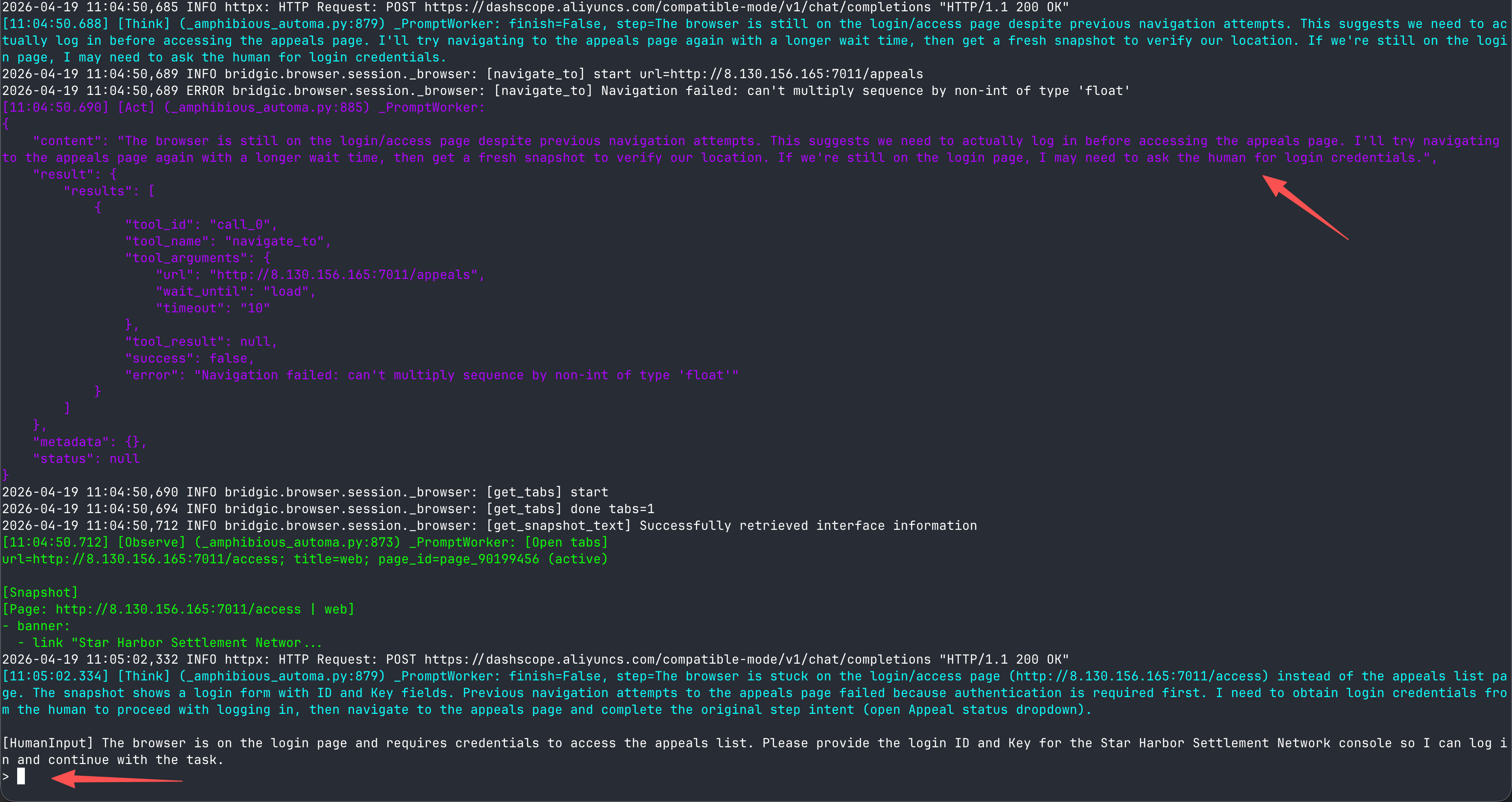
Once the authentication issue is resolved, the amphiflow switches back to workflow mode and resumes execution:
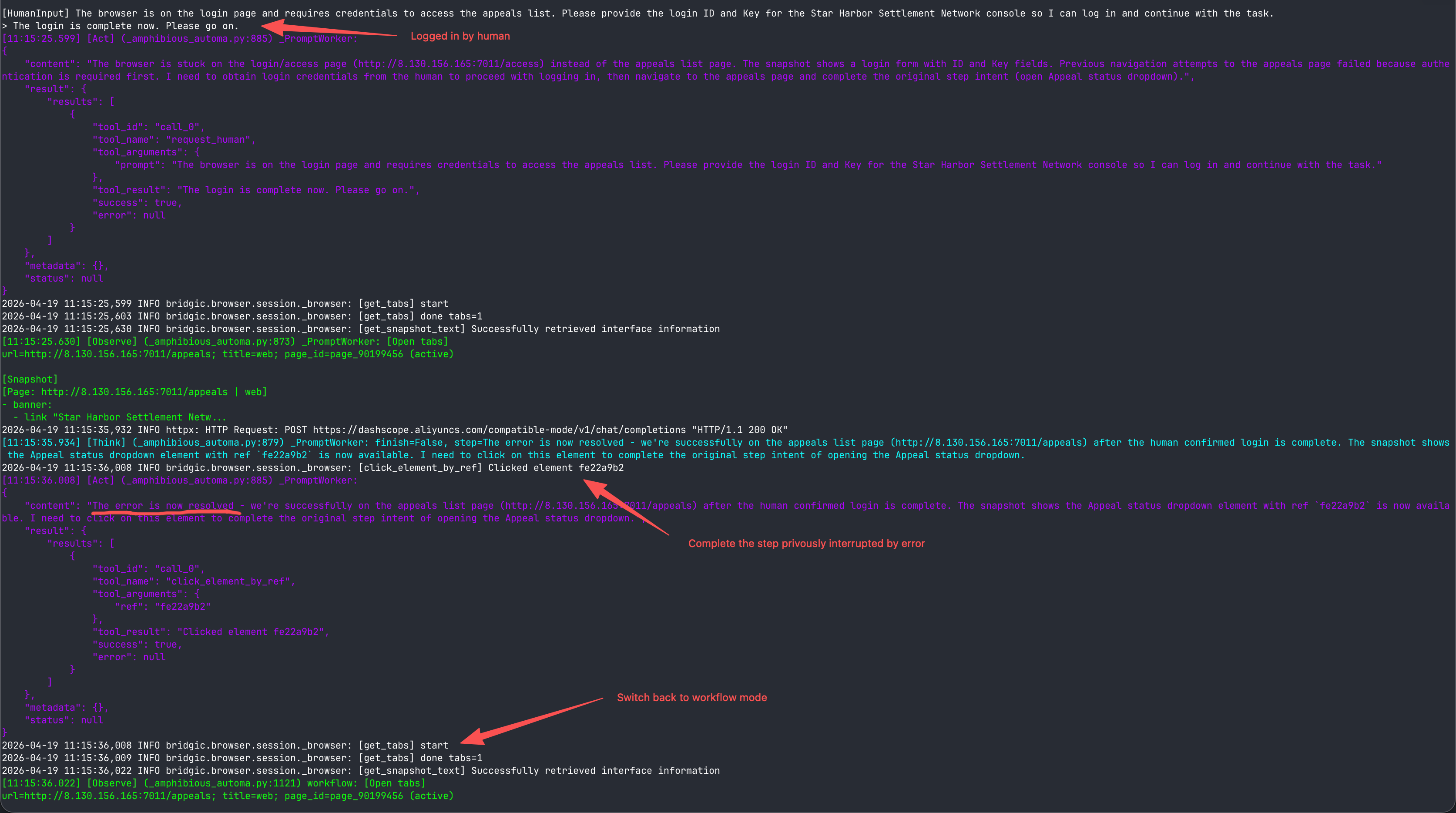
Note: in this example, the reason workflow mode errored was the login state had expired. But in practice, the cause of errors may come from many aspects: page changes, network errors, config expiration, or various environmental changes. Since the way amphiflow handles errors is not hard-coded logic but switches to agent mode for autonomous decision-making, it can in theory handle various error situations.
Relationship and Difference Between the AmphiLoop Plugin and the bridgic-browser Skill
In my earlier article A Brand-New Browser Tool Set + Skills Designed for the “Explore + Code” Paradigm, I released a browser automation tool library bridgic-browser and the corresponding skill. Today’s AmphiLoop plugin is a complete technology package—a brand-new methodology, tech stack, and toolchain for building AI agents. When this technology is used for browser automation tasks, it depends on the bridgic-browser tool library.
After AmphiLoop plugin’s release today, the use cases for it and the bridgic-browser skill are now clearly separated:
When you’re using Claude Code, OpenClaw and similar agent products, and want to kick off some ad-hoc browser automation tasks, you can install the bridgic-browser skill. The installation command is:
npx skills add bitsky-tech/bridgic-browser --skill bridgic-browser
When you want to tailor a solution for long-running, routine automation task, or when you face challenges caused by frequent requirement changes, high token costs, and environmental changes, please use the AmphiLoop plugin. It’s a more systematic solution. With this system, you can push AI capabilities into broader and deeper scenarios, including automation scenarios that OpenClaw-like products cannot solve.
There’s a detail that comes with this technology upgrade, which you should note: the previous “explore first, the code” guidance logic in the bridgic-browser skill has been removed from the skill and merged into the AmphiLoop plugin, upgraded to the new “explore - code - verify” loop, with stronger controllability and higher success rate.
AmphiLoop’s Design Philosophy
Due to length constraints, we can’t go deep into this topic here. Very briefly, I’ll touch on the design philosophy behind AmphiLoop and some key implementation points. There should be more opportunities to discuss this later in depth.
- Use autonomy well, isolate randomness, and achieve certainty. “Autonomy” is the new capability the AI era has given us, but along with it comes the disturbance of randomness. AmphiLoop applies autonomy to the program build stage and to agent mode at runtime; it isolates random disturbances by distinguishing build-time from runtime, and distinguishing agent mode from workflow mode.
- Decoupling Decision from Execution. Only this way can an amphiflow—a new kind of program—be driven by the model (agent mode) as well as by program logic (workflow mode). AmphiLoop is the world’s first agent architecture adopting “decision-execution decoupling.”
- Manageable natural-language task description. Building everything starting from natural language ensures high efficiency under requirement changes and adaptability to environmental changes; the
TASK.mdform also avoids the traditional dialog-box “use-once-and-discard” drawback—it’s upgradable, maintainable, and version-controllable. - The “explore - code - verify” methodology. This methodology greatly boosts the build success rate, letting users mostly just answer multiple-choice questions, and typically finish in a single session.
- Verify as much as possible. Verify helper methods, verify basic execution of the artifact program, verify execution results specified in Expected Output—fully leverage every verifiable resource.
- The “observe - think - act” loop integrated with Amphibious-mode. The two modes (workflow mode and agent mode) share Observe and Act, with Think independent in each.
- Control and call sequence interleaved. Workflow mode is not simple recording; it has dynamic capabilities like branching and loops.
- Workflow programs also contain agent modules. Different from amphibious-mode switching, AmphiLoop’s workflow programs can also embed agent modules, used to capture “uncertainty” segments in the task or generative subtasks.
- Amphibious-mode context sharing.
- Closed-loop evolution between build-time and runtime.
- Abstraction layers exist in natural-language form. Skills are user manuals, Commands are orchestration flows; natural language can also be injected, building layered relationships between abstract and concrete.
- Guide rather than restrict—work like a harness. Through skills, commands, hooks, subagents, and the underlying code framework, we only provide necessary, key, methodological guidance to the build process, letting AI fill every gap like water.
Summary
Currently, where OpenClaw truly creates value is still creative and generative tasks (also the tasks with relatively few deterministic components). This isn’t new; it just gives ordinary people a way to achieve it (able to call tools, connect channels, manage context), completing the transition from “can’t” to “can” (whether it’s convenient or not is a separate question).
According to the task classification earlier in section 2, in the real world most tasks may actually fall into hybrid tasks, containing both deterministic and uncertain parts. AmphiLoop provides a different solution approach than OpenClaw’s, and covers scenarios that are not totally the same. This technology adds a “build” stage, transforming tasks originally described in natural language into amphiflow programs with amphibious capability. On one hand, this transformation lets the deterministic parts of the task be completed in workflow mode, while the uncertain parts that need autonomy are completed in agent mode. On the other hand, the transformed amphiflow artifact can also switch between workflow mode and agent mode.
AmphiLoop’s way of working allocates AI’s autonomy capability in the optimal way, which also makes it theoretically the most token-efficient AI solution. In theory, with a small build cost, it can cover more scenarios and reasonably and stably complete more hybrid tasks.
It’s worth noting that a token-efficient solution does not necessarily reduce total token consumption, as it expands the range of application scenarios for AI. Overall, token optimization technologies may further drive the growth of the token economy.
I once mentioned in the article As the New Year Arrives, Let’s Talk About AI and Humanism that in the book titled “The Nature of Technology: What It Is and How It Evolves”, the author opens up the black box of technology and shows that, at its core, it is also driven by “process”. Apparatus, methods, and processes can essentially be understood as belonging to the same category—what we often call a “workflow” today.
One could say that, given a sufficiently fine level of granularity, technology is a process, and thinking is also a process. Processes are ubiquitous, and so is the demand to automate them (or workflows). This forms an extremely vast landscape.
Community
(1) We have created a Discord community. Please visit the address below to join discussions:
(2) New X (Twitter) account (this will be the main channel for publishing version-update announcements):
Docs and Code
bridgic-amphibioustutorial docs: https://docs.bridgic.ai/latest/tutorials/items/amphibious- AmphiLoop project GitHub page: https://github.com/bitsky-tech/amphiloop
- More
TASK.mdexamples, feel free to download and try: https://github.com/bitsky-tech/bridgic-examples/tree/main/amphiloop-browser-examples bridgic-amphibioussub-framework GitHub address: https://github.com/bitsky-tech/bridgic/tree/main/packages/bridgic-amphibiousbridgic-browserbrowser tool set GitHub page: https://github.com/bitsky-tech/bridgic-browser
(End of main text)
Other featured articles:
- What Do Claude Managed Agents Mean?
- [Open Source] A Brand-New Browser Tool Set + Skills Designed for the “Explore + Code” Paradigm
- As the New Year Arrives, Let’s Talk About AI and the Humanities
- The AI Agent Era May Reset to Zero Starting in 2026
- [Open Source] An AI Framework I Built by Hand: The Thinking Behind It
- Software Development Paradigms in the AI Agent Era
- The Concepts, Degree of Autonomy, and Levels of Abstraction of AI Agents
- A Primer: Unpacking the Probability Theory Behind LLMs
- What Does the Most Important Paper in Distributed Systems Actually Say?
Original article. Please credit the source when reposting.
Permalink: http://zhangtielei.com/en/posts/blog-bridgic-amphiloop-en.html